Face Capture
Face capture is the process of taking snapshots of human faces in the detection area. It is a perfect complement to your surveillance system and an efficient solution to help you improve customer service and protect your assets by identifying important customers or potential perpetrators.
For setting up face capture, please refer to the video below:
Popular Applications
The face capture camera is usually installed at front entrance and capture the face of each individual who entered the property. The benefits of face capture are evident: detection and prevention of crime. If coupled with back-end analysis system, the function can be used to identify a person in large databases by monitoring large groups of people and rapidly identify potential security threats or suspects at airports, public gatherings or sports arenas using real-time face detection.
Installation
Install the camera in an overlooking position in front of the entrance, with a recommended height of 3.5 to 5 m. Recommended view angle is 60° to 80°, and the recommended surveillance area width is 1 to 4 m.
Interference:
① Illumination: If no illumination is available, it is recommended to install one 25 W light bulb every 1 meter at 3 meters above ground in front of the detection area. Otherwise, snapshot rate will be affected.
② Obstruction: Human faces cannot be detected when covered in masks or helmets.
③ Face angle: The angle between the face and camera should be within 30° horizontally and 15° vertically.
④ Front lighting and backlighting: Avoid these scenes in which faces will be either too dark or overexposed.
⑤ Face density: Up to 8 faces can be detected simultaneously by a single box camera.
⑥ Moving speed: Scenes in which objects move at higher speed such sidewalks are not recommended, objects of more than 10 km/h may cause snapshot failure.
Setting
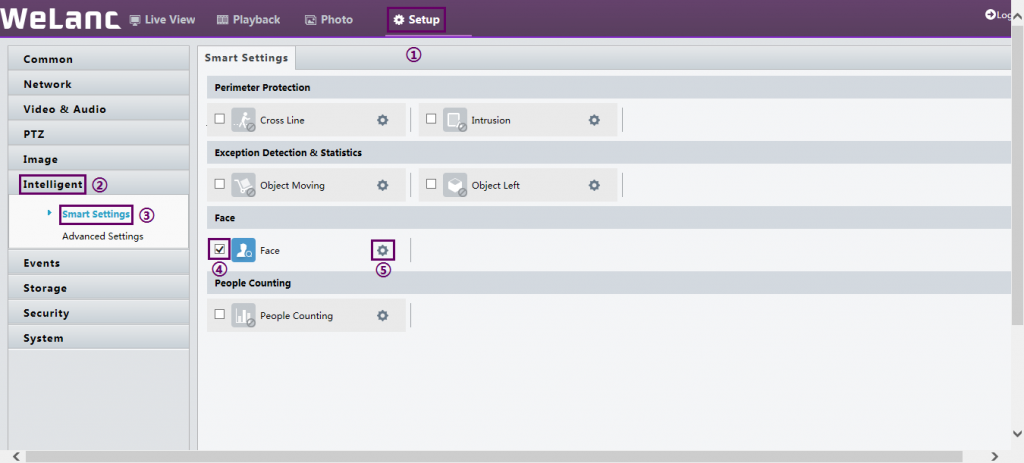
Click Setup > Intelligent > Smart Settings. Choose Face and then click  .
.
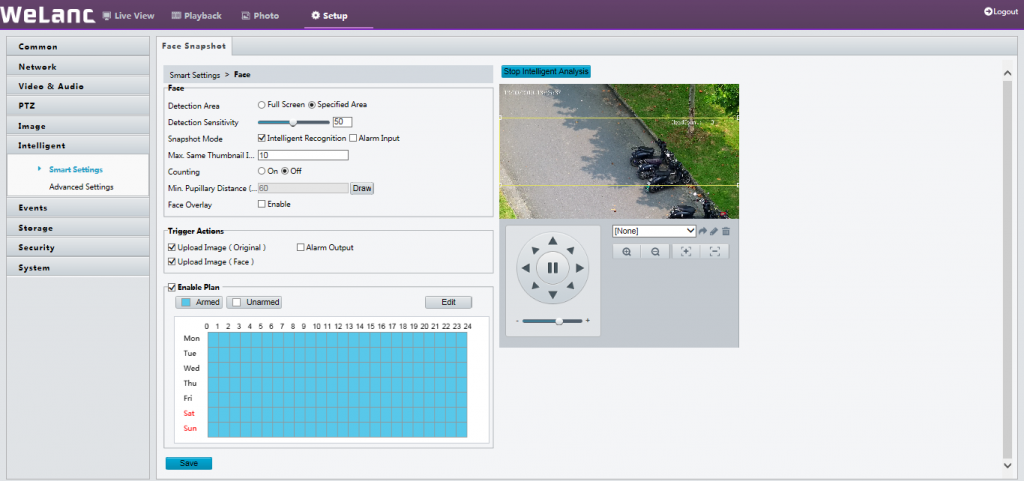
Detection Area: You can set to detect and capture face appeared in the selected area or in the full screen.
Max. Same Thumbnail Images: Set the maximum thumbnail image of the same face.
Min Pupillary Distance (px): The minimum pupillary distance of the detection object.
Counting: Turn on to count the number of faces detected by the IP camera.
Face Overlay: Show green detection box on the screen.